

18 min read · Updated: 2026-11-28
To use a magnetic power bank, check that your phone supports magnetic wireless charging or has a compatible magnetic case, then align the bank with the phone’s charging coil until it holds securely. Confirm the charging indicator appears, keep both devices uncovered in a cool place, and disconnect the bank when charging is complete or the phone becomes unusually warm.
Magnetic attachment helps keep the charger aligned, but it does not guarantee compatibility or the fastest charging speed. Check your phone and case specifications, as well as the power bank’s charging standard and output, before relying on it for a full charge.
The guide below covers attachment, setup, product choices, and common heat or charging issues. A few checks before use can make a magnetic power bank more convenient and help protect your phone and battery.
- Check phone and case compatibility before attaching a magnetic power bank.
- Center the bank and confirm charging has started.
- Choose capacity and features to suit your routine, while accounting for added size and wireless charging losses.
- Stop charging and let devices cool if they become unusually hot.
How Magnetic Power Banks Attach and Charge
Magnets and Charging Alignment
A magnetic power bank uses magnets to hold its charging coil close to the compatible phone’s coil, helping maintain the alignment needed for wireless power transfer. The magnets do not carry electricity; the charger sends energy through the phone’s back panel once the coils are positioned together. A firm attachment is useful, but it does not prove that charging has started.
- ☐ Confirm the phone supports wireless charging before choosing a magnetic bank.
- ☐ Use a compatible magnetic case or ring if the phone lacks built-in magnetic alignment.
- ☐ Center the charger on the phone’s back and check for a charging indicator.
- ☐ Remove metal plates or accessories that sit between the phone and charger.
Compatibility depends on the phone’s wireless charging support and the power bank’s design, not simply on whether the phone is made of metal or glass. Some phones need a magnetic case or an adhesive magnetic ring to hold the bank in place. Check that any case or accessory is designed for the phone’s charging system and does not obstruct the coils.
After attaching the bank, look for the phone’s charging symbol or the charger’s indicator light, and reposition the bank if neither appears. A case that is too thick, a metal plate, or an off-center attachment can interrupt charging even when the magnets seem secure. Readers documenting charging accessories for others may use white label link building to share practical guides through partner publications.
What Happens During Charging
Wireless charging transfers energy between coils, so some energy becomes heat rather than reaching the phone’s battery. A magnetic bank may charge more slowly than a wired connection, especially if the phone is in use or the charger and phone are warm. The actual rate also depends on the phone, power bank, charging standard, and their negotiated output.
The power bank’s stated capacity describes stored energy, not the exact amount that will reach a phone. Conversion losses, the phone’s battery size, and use during charging all affect the result, so expect less usable energy than the capacity label alone suggests. Treat capacity as a comparison guide rather than a promise of a particular number of full charges.
Many models let you attach the bank and continue using the phone, but the added weight can make one-handed use awkward. A bank may also cover a rear camera or interfere with a stand, depending on its size and placement. Check charging status occasionally, particularly after attaching it through a case or while using power-intensive apps.
How to Use One with Your Phone
A Reliable Setup Routine
Start with a charged power bank and a phone case that allows magnetic attachment and wireless charging. Wipe dust or grit from both contact surfaces, place the bank centrally on the back of the phone, and wait for the charging symbol or indicator before putting the phone away. A tech writer explaining this setup may use a guest post marketplace to find relevant outlets for a practical guide.
- Attaching the bank without checking for a charging indicator; verify charging before walking away.
- Using a thick or metal-backed case; test with a compatible case or without the case.
- Leaving the phone charging under bedding; move it to an open, hard surface.
If charging does not begin, lift the bank and reposition it rather than repeatedly pressing it against the phone. Remove a thick case, metal card holder, or other accessory that could separate the coils, then test again. If the bank has a power button, follow its instructions; some models start automatically, while others need a button press.
Keep the phone and bank together on a stable surface when you want an uninterrupted charge, and avoid putting the combination under bedding or inside a tightly packed bag. Those conditions can trap heat and make it harder to notice a loose connection. If the phone is nearly full or you no longer need the extra charge, detach the bank to reduce unnecessary warmth.
- Charge the power bank before leaving home.
- Remove accessories that block the charging area.
- Center the bank and confirm charging has started.
- Place the phone on a clear, stable surface.
Using the Phone While Attached
You can usually handle messages or make calls while a magnetic bank is attached, but demanding tasks may slow charging and increase heat. Gaming, navigation, video recording, and high screen brightness all draw power while the bank is trying to replenish it. For a steadier charge, pause intensive tasks or lower screen brightness until you can disconnect the charger.
Check that the bank does not obstruct the camera, buttons, or your grip before carrying the phone around. A heavy pack can make the phone easier to drop, and repeated movement may shift a weaker magnetic connection. If the bank feels loose, stop using the phone one-handed and reposition it on a flat surface.
Some banks can charge a phone while connected to a cable, but the order and behavior vary by model. Read the instructions before using pass-through charging, and avoid assuming that every combination will charge both devices safely or efficiently. If you write about magnetic charging for a technical audience, a guest post marketplace can help identify suitable publications for that explanation.
Choosing a Power Bank for Your Setup
Match Standards and Capacity
Choose a magnetic power bank that supports your phone’s wireless charging standard and the magnetic alignment system your case uses. Standards and phone models can differ in charging speed, so check both the phone and charger specifications rather than relying on a magnetic fit alone. Writers preparing a hands-on guide can use buy guest posts online to place it with readers interested in charging accessories.
Capacity is a trade-off between reserve power and the size and weight you carry. A compact bank may suit a short commute or an emergency top-up, while a larger one can provide more stored energy but feel bulkier on the phone. Compare the stated capacity with the bank’s dimensions and weight, and remember that wireless conversion reduces energy delivered to the phone.
Look at the bank’s output, charging input, and indicators as well as its capacity. A clear battery-level display helps you judge when the bank needs recharging, while a USB-C port may offer a wired option if wireless charging is slow or inconvenient. Confirm that the included or separately purchased cable and wall adapter meet the maker’s requirements.
| Choice | Best suited to | Trade-off |
|---|---|---|
| Compact bank | Short outings and light carry | Less stored energy |
| Higher-capacity bank | Longer time away from an outlet | More size and weight |
| Bank with USB-C output | Wired charging as an alternative | Requires a suitable cable |
| Bank with a stand | Desk use or watching video | Can add bulk |
Balance Portability and Features
Pick a form that suits how you carry and use your phone, not just the largest capacity available. A slim bank is easier to hold during a quick top-up, while a stand or fold-out support can help when watching a screen on a desk. Check that any added feature does not cover the camera or make the attachment unstable.
Consider whether you want wireless charging alone or a bank that also has a USB-C output for wired charging. A cable can be useful when a case prevents magnetic alignment or when you need to charge another compatible device. Check the port’s supported output and the product instructions, since the presence of a port does not indicate its speed.
Before buying, compare the bank’s dimensions with the phone and case you actually use. Confirm that the magnet arrangement is compatible, that the charging indicator is easy to understand, and that the bank can be recharged with equipment you already own. These checks help avoid choosing a model that technically fits but proves awkward in everyday use.
- Choose compact dimensions for frequent carrying.
- Consider a built-in stand for desk use.
- Check for a USB-C output if wired charging matters.
- Confirm compatibility with your actual phone case.
Avoid charging the phone on soft bedding, in direct sun, or inside a closed bag, because these settings hold heat around the devices.
Avoiding Heat and Charging Problems
Keep Charging Temperatures Manageable
If the phone or power bank becomes unusually hot, detach the bank and let both devices cool in an open, shaded place. Wireless charging naturally produces some warmth, but strong heat can indicate poor alignment, heavy phone use, or limited airflow. If an accessory maker has a genuine product safety update, press release distribution uk may help it reach UK outlets.
- Detach the bank if either device becomes unusually hot.
- Charge in an open, shaded place with airflow.
- Stop using a bank that is damaged, swollen, or repeatedly triggers temperature warnings.
Avoid charging the phone on soft bedding, in direct sun, or inside a closed bag, because these settings hold heat around the devices. Remove a case temporarily if it is trapping warmth, then resume charging only after the phone has cooled. Do not put either device in a refrigerator or freezer; sudden temperature changes can cause damage or condensation.
Reduce heat by centering the bank, closing demanding apps, and avoiding simultaneous charging from multiple sources unless the instructions allow it. If the phone repeatedly stops charging or displays a temperature warning, disconnect the bank and investigate rather than forcing the connection. Persistent heat, swelling, unusual odor, or visible damage calls for stopping use and following the manufacturer’s safety guidance.
Troubleshoot Interrupted Charging
When charging cuts out, first check the phone’s battery status and the power bank’s remaining charge. Then remove the bank, clear debris from the phone and charger surfaces, and attach it again with the coils centered. Check for a case, metal plate, or grip accessory that may have shifted or created too much distance between the coils.
If the connection still fails, test the phone with another known-compatible wireless charger or test the bank with a compatible phone, if available. This helps distinguish a phone setting or compatibility issue from a depleted or faulty power bank. Consult the instructions before resetting the bank or changing any charging mode, since controls differ across models.
Stop using the product if its casing is cracked, the battery appears swollen, or it smells unusual; do not attempt to open or repair a sealed power bank. Use the recommended cable and charging adapter when replenishing the bank, and keep its ports dry and free of debris. For recurring faults, contact the seller or manufacturer and provide the model details and a clear description of the problem.
Keeping Your Phone and Battery Safe
Check Case and Magnet Fit
Use a case designed to work with magnetic charging, or test whether your existing case lets the power bank sit flat and hold firmly. Thick, uneven, or metal-backed cases can weaken the magnetic connection or interfere with charging. If the bank slips when you tilt the phone gently, remove the case before relying on it.
Keep cards, keys, and other loose metal objects away from the area between the charger and phone. A magnetic bank is meant to align with the phone’s charging coil, and extra material can prevent a steady connection. A reviewer preparing a detailed comparison can consider a guest posting service to place the article on a relevant site.
Check that the bank’s surface and the back of the phone are clean before attaching them. Dust or grit caught between the two can scratch the case, while oil can make the connection less secure. Wipe both surfaces with a soft, dry cloth, and avoid forcing the bank into place if its magnets do not align naturally.
Watch for Heat Changes
A phone and power bank may feel warm during wireless charging, but they should not become uncomfortably hot. Heat can rise when the devices are charging while running demanding apps, sitting in direct sun, or trapped under bedding. Pause charging and move both devices to a cool, ventilated spot if the warmth becomes concerning.
Avoid charging on soft surfaces that cover the bank or block its ability to release heat. A desk or other firm, open surface is a better place when the phone will remain still for a while. If the phone displays a temperature warning, disconnect the bank and follow the phone maker’s instructions before charging again.
Watch for sudden changes rather than judging safety by touch alone. A bank that repeatedly stops charging, swells, leaks, or gives off an unusual smell should be taken out of use. Do not puncture, open, or continue charging a damaged battery; follow local guidance for disposing of rechargeable batteries safely.
- Pause charging if either device becomes uncomfortably hot.
- Keep the setup out of direct sun.
- Stop using a bank that is swollen or damaged.
Getting More Reliable Charging
Align the Charging Coils
Center the power bank on the phone’s magnetic charging area, then check that the charging indicator appears. Magnetic alignment helps hold the coils together, but a case or attachment can still shift the bank off-center. If charging does not start, lift the bank away and reposition it rather than leaving it attached in a misaligned position.
For a steadier connection, place the phone on a flat surface while the bank begins charging. Moving, bending, or holding the phone at an angle can loosen the attachment, especially when the case is slippery. An agency promoting a charging-accessory business may use an seo agency directory to help customers find its services.
Confirm that the phone continues charging after you set it down or put it in a bag. Notifications, a charging icon, or the bank’s indicator can help reveal whether the connection has dropped. If charging repeatedly cuts out, test without the case and remove nearby magnetic or metal accessories to identify what is disrupting alignment.
Choose the Right Charging Moment
Wireless charging is useful when convenience matters more than speed, such as topping up during a walk or between meetings. For a faster, more predictable charge, use a suitable cable and adapter if the phone and bank support wired output. Check the product instructions, since charging methods and output behavior vary between models.
A magnetic bank can draw on its own stored charge while powering a phone, so it may not be ready for a later outing. Check its remaining-power indicator before leaving home, and recharge the bank with the recommended input when needed. Avoid assuming that a phone’s battery level tells you how much energy remains in the bank.
If the phone is nearly full, decide whether it needs to remain attached. Disconnecting the bank when the top-up is complete can reduce unnecessary warmth and preserve the bank’s charge for later. When you need both devices ready, charge the bank separately rather than expecting a phone and bank to recharge each other at the same time.
- Use wireless charging for convenient top-ups.
- Choose a supported cable for a more predictable charge.
- Check the bank’s own charge indicator before going out.
Sharing a Useful Charging Setup
Explain Compatibility Clearly
When lending a magnetic power bank, first check whether the other person’s phone supports magnetic wireless charging. A phone may support wireless charging without having built-in magnets, so it might need a compatible magnetic case or alignment accessory. Explain that a firm attachment and an active charging indicator are both useful checks before they rely on it.
Show the recipient how to remove the bank without twisting the phone or yanking the accessory sideways. A controlled lift from the edge is less likely to strain a case or make the phone slip from their hand. Point out any ports, buttons, or indicators they may need, and make sure they know which cable fits the bank.
If the bank is shared during travel, agree on who will recharge it and where it will be stored. Keep it away from loose metal objects and liquids, and do not leave it exposed to a hot car interior. Clear handoffs prevent someone from discovering an empty bank only when they need a charge.
Pack Cables and Accessories
Pack the charging cable needed to recharge the bank, even if you expect to use it wirelessly with your phone. The bank’s input port and the phone’s charging port may use different connectors, so check both before packing. A short cable can reduce tangles, but it should still reach a suitable power source without strain.
Keep the bank and its cable in a separate pocket from coins, keys, and other items that could scratch surfaces or press on controls. If you carry spare magnetic accessories, store them so they do not attach unexpectedly to the bank or phone. A small pouch can keep the charging kit together and make missing parts easier to spot.
Before lending or packing the setup, inspect the cable for split insulation, bent connectors, or loose ends. Replace damaged cables instead of forcing them into a port, since a poor connection can interrupt charging or damage the device. Make sure everyone using the bank knows not to pull a cable out by its cord.
- Pack the bank’s recharge cable.
- Store it away from keys and coins.
- Check cables and connectors for damage.
Caring for Your Power Bank Over Time
Store It in Suitable Conditions
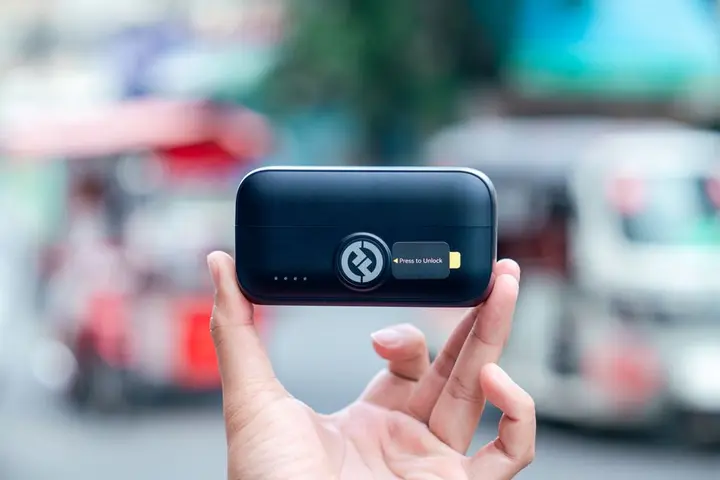
Store the bank in a dry place at a moderate indoor temperature, away from direct sun, heaters, and damp areas. Avoid leaving it in a parked car, where heat or cold can affect its battery and performance. If the manufacturer gives specific storage guidance, follow that advice for the model you own.
- Disconnect the power bank from the phone.
- Check the casing for damage.
- Store it somewhere dry and away from heat.
- Follow the manual’s advice before long-term storage.
For longer periods without use, check the manual for its recommended charge level and storage routine. Do not assume that leaving a bank completely empty or continuously connected to a charger is best. Keep it somewhere you can inspect it occasionally, and recharge it according to the maker’s directions before taking it out again.
Protect the bank from knocks and pressure in a crowded bag. A hard object pressing on it can damage the casing or controls, even if the bank still appears to work. If the shell becomes cracked, distorted, or unusually warm in storage, stop using it and seek the manufacturer’s guidance rather than testing it on a phone.
Inspect and Clean It Gently
Inspect the bank regularly for a loose port, damaged casing, worn cable, or magnets that no longer hold securely. Small changes can explain why charging becomes unreliable, but a damaged battery should not be repaired at home. Stop using it if you notice swelling, leakage, a burning smell, or repeated unexpected shutdowns.
Clean the bank with a soft, dry cloth and keep liquids away from its ports and controls. Do not spray cleaner directly onto it or scrape the magnetic surface with a sharp object. If dirt remains around a connector, use the cleaning method recommended by the manufacturer rather than inserting metal tools.
Recharge the bank with a compatible power source and cable, following its instructions. If charging takes unusually long or the bank no longer holds enough charge for your needs, check the cable and adapter before deciding the battery has failed. When performance remains poor, consult the maker’s support information and arrange appropriate battery recycling.
- Wipe surfaces with a soft, dry cloth.
- Keep liquids and sharp tools away from ports.
- Recycle a worn-out bank through an appropriate local service.
Frequently asked questions
Can I use a magnetic power bank with any phone?
Not necessarily. A phone needs wireless charging support for the bank to charge it wirelessly, and a secure magnetic attachment may require built-in magnets or a compatible case. Check the phone and power bank specifications before buying. If the phone does not support wireless charging, a bank with a suitable cable output may still charge it through a wired connection.
Can I use my phone while the bank is attached?
Yes, but movement can shift the bank and interrupt charging, particularly if the case is thick or slippery. Check that the connection remains active when you pick up the phone, and avoid activities that could make the bank catch on something or fall. If a steady charge matters, leave the phone on a firm surface or use a supported wired connection.
Why does my magnetic power bank stop charging?
Common causes include poor coil alignment, an incompatible or thick case, low charge in the bank, or excess heat. Remove the bank, check its indicator, clean the contact surfaces, and reattach it carefully. If charging still cuts out, test without the case and review the device instructions; stop using the bank if it shows damage or unusual heat.
Is it safe to leave a magnetic power bank attached overnight?
Follow the instructions for both the phone and the bank rather than assuming overnight use is suitable for every model. Keep the setup on a firm, ventilated surface, away from bedding and direct heat, and disconnect it if either device becomes unusually hot. For routine overnight charging, use a setup specifically recommended by the device makers.
Make Your Charging Routine Dependable
A magnetic power bank works best when its magnets align cleanly with a compatible phone, the charging indicator confirms the connection, and the setup stays cool. Cases, movement, and depleted bank capacity can all interrupt a top-up, so check those basics before assuming the hardware is faulty. Treat a damaged or swollen battery as unsafe, and store a working bank away from heat and moisture.
Before your next outing, test the bank with your usual case, confirm it charges, and check its own remaining-power indicator. Pack the cable needed to recharge it, and keep the setup away from keys, liquids, and hot surfaces. If wireless charging proves unreliable for your phone, compare the product instructions and consider a supported wired option instead of forcing a poor magnetic fit.


